Extract PDFs From Claude with the PDF Extractor MCP Server
By the PDF Extractor engineering team.
PDF Extractor now ships with a Model Context Protocol (MCP) server so AI assistants like Claude can run PDF image extraction, PDF table extraction, OCR, and other document workflows through the PDF extraction API -- no copy-paste, no manual API calls, no glue scripts.
If you've ever asked Claude to "look at this PDF" and watched it struggle with a wall of unstructured text, this is the missing piece. With one config snippet, Claude can call PDF Extractor as a tool: hand it a path or a URL, ask for the tables, get back structured results it can reason about.
This post covers what the server does, how to install it, and how to drive it from Claude Desktop or Claude Code.
What is MCP, briefly?
The Model Context Protocol is an open standard from Anthropic that lets AI assistants connect to external tools and data sources. Think of it as USB-C for LLMs: one cable, many devices.
An MCP server exposes a set of tools (functions the model can call); an MCP client (Claude Desktop, Claude Code, Cursor, etc.) discovers those tools and lets the model invoke them. Servers can run locally as a subprocess or remotely over HTTP -- the PDF Extractor server runs locally over stdio, which keeps your API key on your machine.
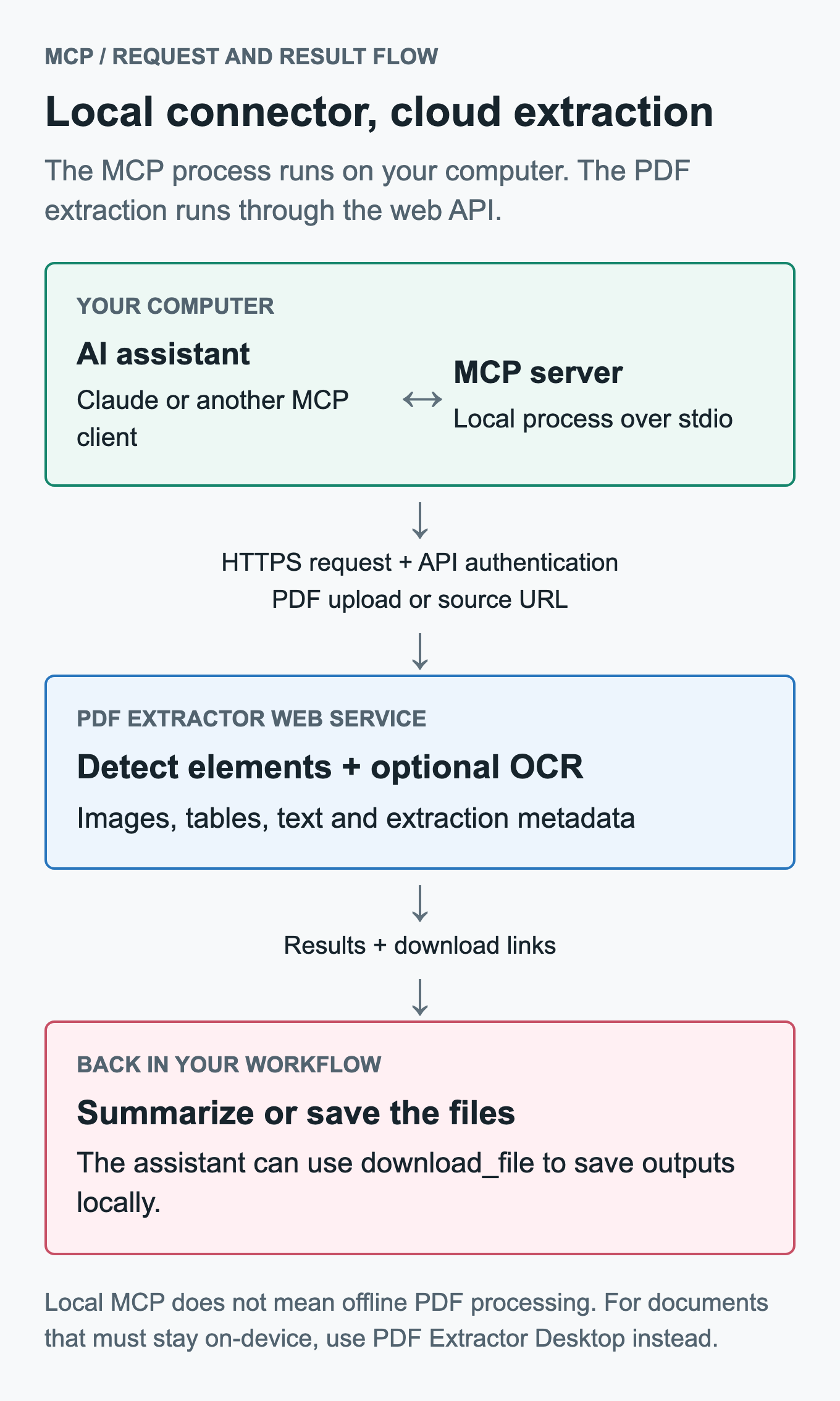
The connector is local; extraction is not. It sends API authentication and the PDF upload or source URL to the web service. Use the offline desktop app when the document must stay on your computer.
What the PDF Extractor MCP server gives Claude
Six tools that map cleanly onto the PDF Extractor API:
| Tool | What it does |
|---|---|
extract_elements | Extract elements from a single PDF (local path, http(s):// URL, or base64 data). |
extract_elements_batch | Extract from multiple PDFs in one call. Business tier required. |
list_extractions | Page through your past extraction jobs. |
get_extraction | Fetch details and files for a specific extraction. |
delete_extraction | Remove an extraction job. |
download_file | Fetch a presigned Files[].Url from an extraction (optionally save to disk). |
Each tool accepts the same knobs you'd use against the REST API directly: page ranges, image resolution and format (JPG / PNG / TIFF), category filters (Image, Table, Text, Title, SectionTitle, Caption, Footnote, Expression, Entry, Header, Footer), confidence and IoU thresholds, OCR settings, and password support for encrypted PDFs.
Install
The server is published to PyPI as pdf-extractor-mcp. You don't need to install it ahead of time -- uvx will fetch and cache it on first launch:
# zero-setup option used by the config below
uvx pdf-extractor-mcp

# or a persistent install
pipx install pdf-extractor-mcp
Requirements: Python 3.10+. That's it.
Connect Claude
First, generate an API token from the PDF Extractor token page. Keep it handy.
Claude Desktop
Open the config file (Settings → Developer → Edit Config, or):
- macOS:
~/Library/Application Support/Claude/claude_desktop_config.json - Windows:
%APPDATA%\Claude\claude_desktop_config.json
Add the server entry:
{
  "mcpServers": {
    "pdf-extractor": {
      "command": "uvx",
      "args": ["pdf-extractor-mcp"],
      "env": {
        "PDF_EXTRACTOR_API_KEY": "pdf-ext_your_token"
      }
    }
  }
}
Save, then fully quit and reopen Claude Desktop (Cmd-Q on macOS -- closing the window isn't enough). The tools appear under the tools/plug icon in the chat box.
Claude Code (CLI)
One command:
claude mcp add pdf-extractor \
  --env PDF_EXTRACTOR_API_KEY=pdf-ext_your_token \
  -- uvx pdf-extractor-mcp
Verify with claude mcp get pdf-extractor and /mcp inside a session.
Cursor, Windsurf, and other MCP-aware clients
Use the same command/args/env shape in whatever JSON or YAML config your client supports. The server only requires PDF_EXTRACTOR_API_KEY and speaks stdio.
Try it
Once the server is connected, talking to it is just natural language:
"List my PDF extractions from the last week."
"Extract all tables from
~/Downloads/q3-report.pdfas PNG and tell me how many there are.""Pull every figure caption from pages 5-12 of
https://arxiv.org/pdf/2401.12345.pdf.""Open the receipts in
~/Documents/receipts/and extract just the totals."
Claude picks the right tool, fills in the parameters, and responds with the results. With store_file=true (the default) the response contains presigned URLs that Claude can summarize or hand to download_file to save locally.
OCR: tesseract or advanced (VLM)
The MCP server exposes the full OCR surface, including the recently-added vision-language-model engine.
ocr_mode:none(default),element(per detected element), orpage(whole page).ocr_engine:tesseract(default, fast, plain text only) oradvanced(vision-language-model OCR).ocr_output_format:text(default),markdown, orjson.
The advanced engine reads pages with a vision model that understands layout: it returns headings, tables, multi-column flows, and inline images as structured text. See the PDF OCR workflow for the page and element modes. Advanced OCR requires ocr_mode=page and a Starter or Business tier subscription.
Example prompts:
"Run advanced OCR on
scan.pdfand give me the result as markdown."
"Use the advanced OCR engine on pages 1-3 of
report.pdfand return JSON."
These map onto ocr_engine="advanced" and ocr_output_format="markdown" or "json".
Tier requirements at a glance
| Capability | Tier |
|---|---|
| Single-PDF extraction (no OCR) | Free and up |
ocr_mode=element or page (tesseract) | Starter or Business |
ocr_engine=advanced (VLM) | Starter or Business |
extract_elements_batch | Business |
Pricing and page limits live on the PDF Extractor pricing section.
Self-hosted or staging environments
Point at a different deployment by setting PDF_EXTRACTOR_API_URL:
"env": {
  "PDF_EXTRACTOR_API_KEY": "pdf-ext_...",
  "PDF_EXTRACTOR_API_URL": "https://pdf.example.com"
}
The server appends /api to whatever base URL you provide.
Source and feedback
- PyPI: pypi.org/project/pdf-extractor-mcp
- Source: github.com/BorisBesky/pdf-extractor/tree/main/mcp_server
- Documentation: PDF Extractor MCP Wiki
- Bug reports: Open a public bug report
- Enhancement requests: Suggest an improvement
The MCP server is open-source under the same Apache 2.0 license as the rest of PDF Extractor. PRs welcome -- especially for new client integrations or tooling improvements.
Got a workflow where MCP-driven PDF extraction would help? Try it out, and let us know what you build.