Leading desktop PDF extraction tools vs Adobe
By the PDF Extractor engineering team.
Updated October 5, 2026 with a concise “best desktop tool” answer box and refreshed search metadata. Output-type and extraction-results graphics were added September 27; pricing and product capabilities were last checked against vendor documentation on July 17, 2026. Always confirm current regional pricing before purchasing.
Compare PDF Extractor, Adobe PDF Extract API, LlamaParse, Azure Document Intelligence, Google Document AI, and Tesseract for tables, images, OCR, API access, offline use, and pricing. The right PDF extraction tool depends on the files you need back—not a single accuracy score.
Best desktop PDF extraction tool? For offline, high-resolution figure and table crops with predictable pricing, PDF Extractor Desktop is the leading pick in this comparison. Need LLM-ready Markdown for RAG? Prefer LlamaParse. Need invoice fields inside Azure or Google Cloud? Choose those platforms instead. Use the table below for a fast side-by-side.
Quick comparison: desktop tool vs reliable services
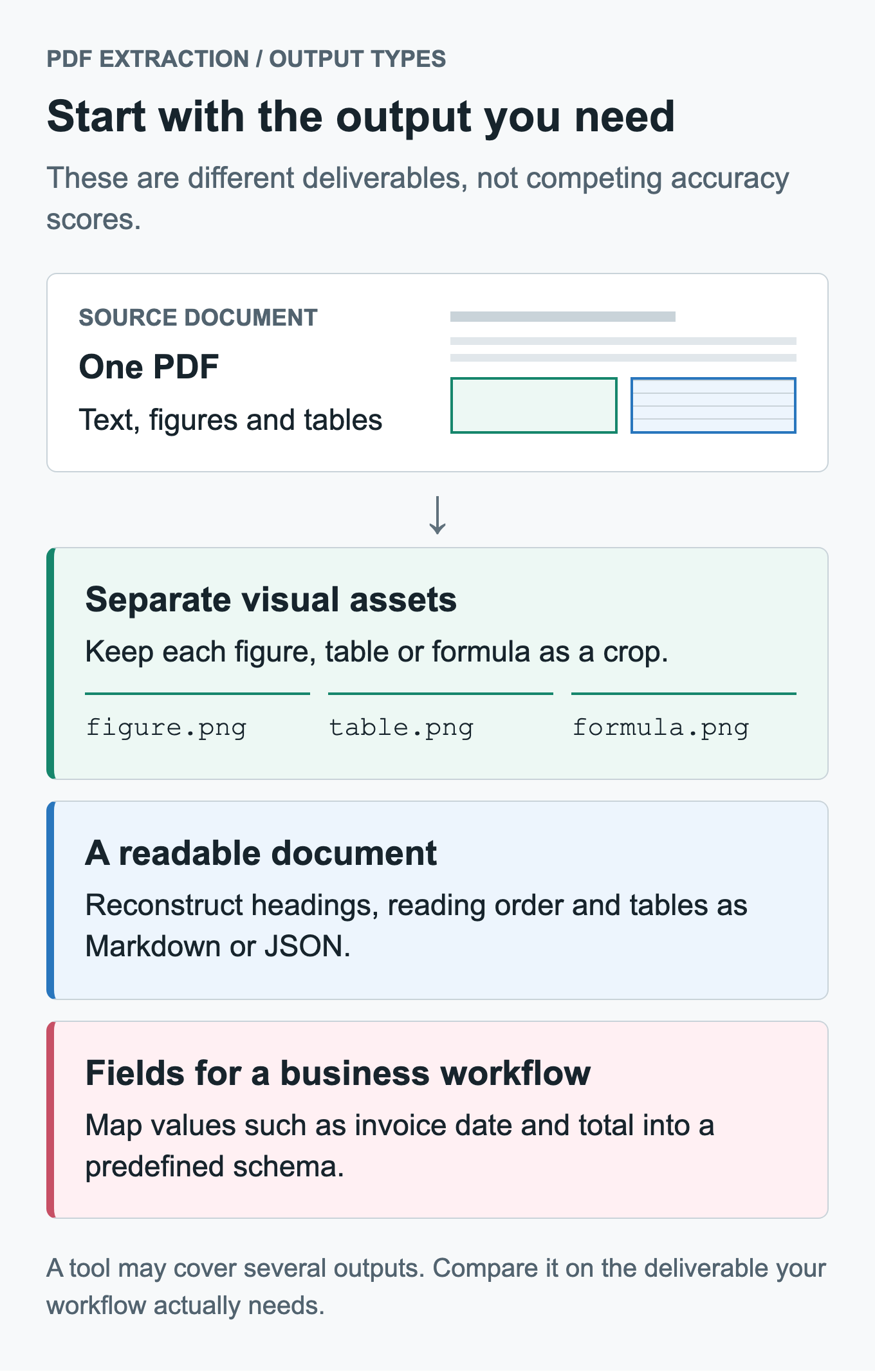
Start with the output you need. A readable transcription, a folder of figure crops, and an invoice-field record solve different problems; a single tool may support more than one.
| Tool | Best for | Primary output | Offline | Visual element crops | Pricing model |
|---|---|---|---|---|---|
| PDF Extractor | Images, tables, formulas, and page elements as separate files | PNG/JPEG/TIFF crops, text, Markdown, JSON | Yes | Yes, 10–800 DPI | Free web tier; paid plans; $24 desktop license |
| LlamaParse | RAG, document agents, and semantic parsing | Markdown, JSON, structured extraction | No | Limited compared with crop-first tools | Credits and subscriptions |
| Adobe PDF Extract API | Structured cloud extraction with reading order and styling | JSON plus extracted tables/images | No | Extracts images, but not a DPI-controlled crop workflow | Free transactions, then paid/volume plans |
| Azure Document Intelligence | Forms, invoices, receipts, OCR, and Azure workflows | JSON fields, text, tables, layout | Containers for selected enterprise scenarios | Not its primary workflow | Per-page and commitment pricing |
| Google Document AI | OCR, layout parsing, entities, and Google Cloud workflows | JSON document structure | No | Not its primary workflow | Per-page by processor |
| Tesseract | Free local OCR inside a custom pipeline | Plain text, TSV, hOCR | Yes | No | Free and open source |
How to choose quickly
- Choose PDF Extractor when you need high-resolution image and figure extraction, structured table extraction, OCR for scanned PDFs, or a low-cost offline desktop workflow.
- Choose LlamaParse when your primary output is LLM-ready Markdown or structured data for RAG and document-agent pipelines.
- Choose Adobe PDF Extract API when you need mature cloud APIs for structured text, tables, images, styling, and reading order.
- Choose Azure Document Intelligence or Google Document AI when document processing must fit an existing cloud platform or prebuilt business-document workflow.
- Choose Tesseract when you need free local OCR and can supply your own layout detection and preprocessing.
This comparison focuses on the decisions that matter in production: output type, scanned-PDF support, offline availability, API access, pricing model, layout awareness, and control over extracted visual assets.
For a quick starting point, use the web app to test a document, download PDF Extractor Desktop for private local processing, or review the PDF extraction API for repeatable workflows. The advanced OCR article shows the Markdown, JSON, and structured-table output available on web and desktop.
Why PDF extraction tools produce different results
PDFs describe how a page should be displayed. They do not guarantee clean semantic structure. A paragraph may be stored as individually positioned characters, a table may be a collection of lines and text fragments, and a scanned page may contain no machine-readable text at all.
Most extraction products therefore use one or more of three approaches:
Native PDF parsing
Native parsers inspect text objects, embedded images, fonts, vectors, and coordinates already stored inside a digital PDF. This can be fast and highly accurate for clean text, but it performs poorly when the page is scanned or when visual structure is not represented semantically.
Visual layout detection
Layout models render each page and detect regions such as titles, paragraphs, figures, tables, captions, headers, footers, and formulas. This works on both digital and scanned documents and is the approach PDF Extractor uses for element detection and cropping.
Vision-language-model parsing
VLM-based systems interpret the rendered page and generate Markdown, JSON, or task-specific fields. They are useful when semantic reconstruction matters more than preserving each visual region as a separate image asset.
PDF Extractor combines visual layout detection with optional OCR. Detection runs first, producing classified page regions. OCR can then run on individual elements or on complete pages using Tesseract or advanced layout-aware OCR.
PDF Extractor
PDF Extractor is an element-first extraction tool. It combines PDF image extraction, PDF table extraction, and PDF OCR in one workflow. It detects eleven user-facing categories—Image, Table, Text, Title, SectionTitle, Caption, Footnote, Expression, Entry, Header, and Footer—and exports each detected region as an individual file.
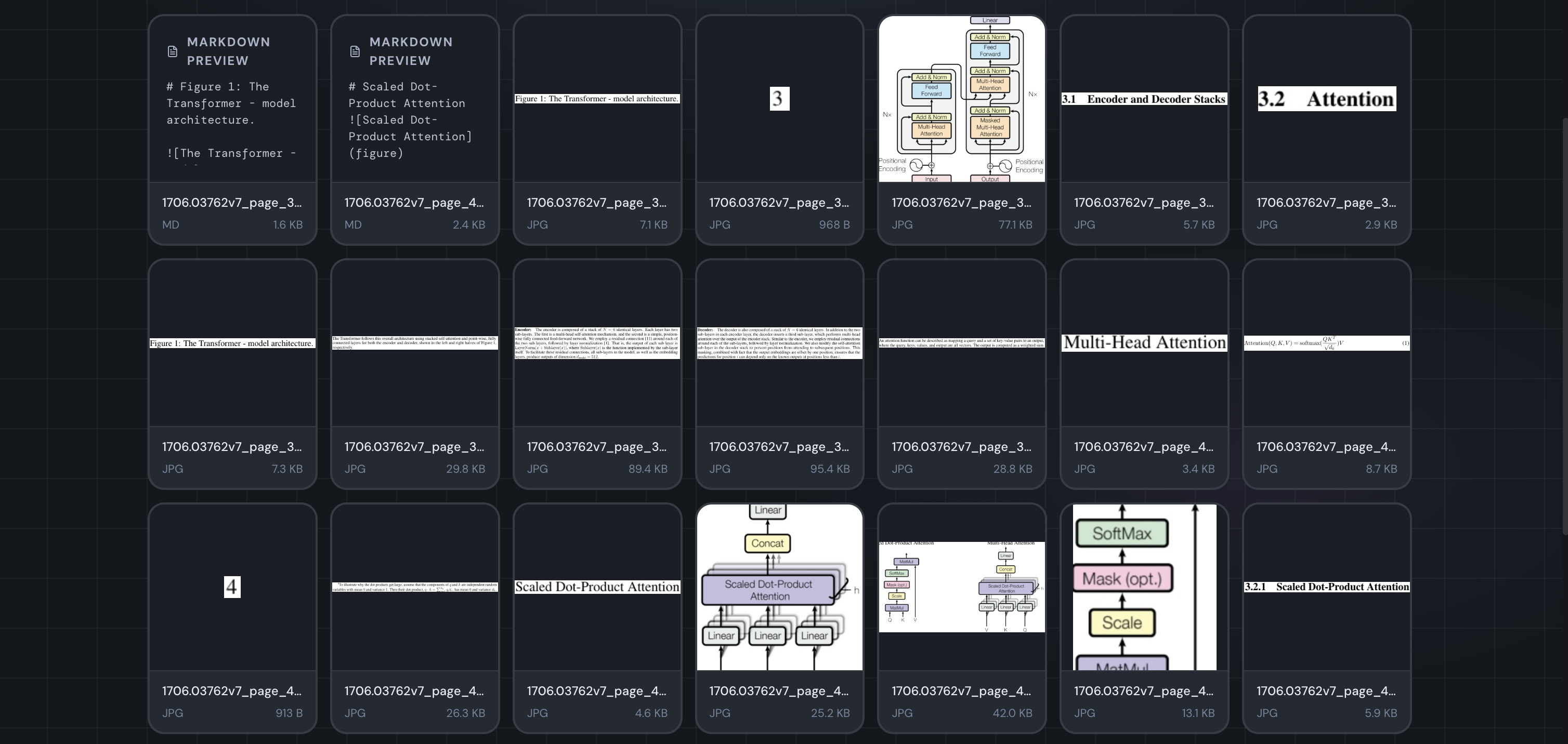
An element-first result: page regions become separate assets rather than a single transcription. This screenshot shows the output interface, not a cross-vendor accuracy benchmark.
Strengths
- Extracts figures, tables, formulas, headings, and text regions as separate assets.
- Preserves visual quality with selectable output resolution from 10 to 800 DPI.
- Works with scanned pages because detection operates on rendered page images.
- Offers page-level and element-level OCR.
- Supports text, Markdown, and JSON output from advanced page OCR.
- Includes a PDF extraction REST API, web application, command-line workflows, and an MCP server for AI assistants.
- Provides an offline PDF extractor and desktop app download for macOS, Windows, and Linux.
- Uses predictable pricing, including a $24 one-time desktop license with unlimited local processing.
Limitations
- It is optimized for locating and exporting page elements, not for extracting invoice fields into a predefined business schema.
- High-DPI rendering and advanced OCR use more compute than native text parsing.
- OCR quality still depends on scan resolution, typography, language, and page complexity.
- Cloud workflows require uploading the document; privacy-sensitive workloads should use the desktop application.
Detection benchmark
The current layout model was evaluated on a held-out set of 1,088 document images containing 17,040 annotated instances from DocLayNet. At class-specific optimal confidence thresholds, the evaluation produced 98.9% mAP@50, 89.3% mAP@50–95, and 98% recall.
These figures measure detection on the validation set, not end-to-end OCR accuracy on every possible PDF. Real-world results vary with page domain, scan quality, rotation, unusual layouts, and the confidence/IoU settings selected by the user.
LlamaParse
LlamaParse is designed for turning documents into production AI data. Its platform includes parsing, structured extraction, classification, splitting, spreadsheets, and indexing.
Strengths
- Produces LLM-ready Markdown and structured data.
- Offers multiple parsing tiers that trade latency, cost, and accuracy.
- Handles complex visual documents with agentic OCR modes.
- Supports more than 130 file formats.
- Integrates naturally with RAG and LlamaIndex workflows.
Limitations
- The hosted platform is cloud-dependent.
- Credit consumption varies by parser tier, model, and output.
- It is content-first rather than a dedicated high-resolution element-cropping tool.
- Cost and latency can rise on large or visually complex document collections.
Pricing snapshot
LlamaParse's official billing documentation lists a free plan with 10,000 monthly credits, a $50 Starter plan with 40,000 credits, and a $500 Pro plan with 400,000 credits. Its credit pricing lists $1.25 per 1,000 credits in North America and Europe. Credit use per page depends on the selected product and parsing tier.
Choose LlamaParse over PDF Extractor when semantic Markdown or schema-driven extraction is the main deliverable. Choose PDF Extractor when separate page assets, DPI control, offline processing, or predictable high-volume costs matter more.
Adobe PDF Extract API
Adobe PDF Extract API returns structured document data, including text, tables, images, styling information, element positions, and reading order.
Strengths
- Strong structured output for digital PDFs.
- Exposes reading order, hierarchy, styling, and positions.
- Can extract text, tables, and images through established SDKs.
- Fits organizations already using Adobe document services.
Limitations
- Cloud-only.
- Geared toward API integration rather than interactive element review.
- Does not provide the same user-controlled 10–800 DPI visual crop workflow.
- Paid pricing beyond the free tier may require a quote or volume agreement.
Pricing snapshot
Adobe's official pricing page lists 500 free Document Transactions per month with access to PDF Services, including PDF Extract. Adobe directs larger paid workloads to pay-as-you-go, volume, or sales-assisted plans.
Choose Adobe over PDF Extractor when document hierarchy and styled JSON are central. Choose PDF Extractor when the output needs to be a folder of precise image, table, formula, and layout crops.
Azure Document Intelligence
Azure Document Intelligence provides OCR, layout extraction, and prebuilt or custom models for common business documents.
Strengths
- Strong OCR and handwriting support.
- Prebuilt models for invoices, receipts, IDs, and other business documents.
- Custom extraction and classification capabilities.
- Enterprise deployment, governance, and Azure integration.
Limitations
- Primarily a field-, text-, and table-extraction platform rather than an element-cropping application.
- Pricing varies by model, region, and purchase option.
- Azure account and cloud configuration add operational overhead for small workflows.
- Offline/container availability is limited to specific enterprise scenarios.
Azure states that Document Intelligence is billed by pages analyzed and offers a free F0 tier for testing. Standard and commitment pricing depends on the selected model and region.
Choose Azure over PDF Extractor for Azure-native invoice, receipt, form, or custom-model workflows. Choose PDF Extractor for quick element extraction, high-resolution crops, and offline local processing.
Google Document AI
Google Document AI provides OCR, layout parsing, form processing, custom extraction, splitting, classification, and summarization within Google Cloud.
Strengths
- Strong OCR and document-layout capabilities.
- Prebuilt and custom processors.
- Natural fit with Google Cloud storage, data, and AI services.
- Scales to large managed workloads.
Limitations
- Cloud-only.
- Processor setup and Google Cloud configuration are heavier than a simple upload/download workflow.
- Visual crop export and DPI control are not the primary product model.
- Costs differ substantially by processor.
Google's official Document AI pricing lists Enterprise Document OCR at $1.50 per 1,000 pages, Layout Parser at $10 per 1,000 pages, and custom/form extraction at $30 per 1,000 pages for the first listed volume tier. Pricing can change and additional processors have separate rates.
Choose Google over PDF Extractor when you need managed OCR or entity extraction inside Google Cloud. Choose PDF Extractor when you need standalone visual assets or an offline desktop workflow.
Tesseract OCR
Tesseract is a free, open-source OCR engine. It recognizes text in images but does not by itself detect document elements or reconstruct complex layouts.
Strengths
- Free and open source.
- Runs locally.
- Supports many languages.
- Integrates into custom applications and batch pipelines.
Limitations
- OCR only: no image, table, formula, or section detection.
- Requires preprocessing and page segmentation for best results.
- Complex layouts, handwriting, and low-quality scans can reduce accuracy.
- Building a complete extraction product around it requires additional components.
PDF Extractor includes Tesseract as an OCR option after layout detection. The two tools are therefore complementary: PDF Extractor finds the regions; Tesseract can read their text.
Which PDF extraction tool should you choose?
Choose PDF Extractor if you need
- Reusable figures and images through PDF image extraction.
- Table crops and CSV, Markdown, or HTML output through PDF table extraction.
- Scanned-page transcription through PDF OCR, with Markdown, JSON, or text output.
- A visual review interface with category filtering.
- Configurable DPI, confidence, IoU, page ranges, and output formats.
- Private local processing with the offline PDF extractor; download PDF Extractor Desktop for your platform.
- Repeatable document pipelines through the PDF extraction API or an MCP client.
Choose LlamaParse if you need
- Markdown or structured data for RAG.
- Agentic parsing and semantic reconstruction.
- Broad office-document format support.
- Parsing, extraction, classification, splitting, and indexing in one AI platform.
Choose Adobe, Azure, or Google if you need
- Enterprise cloud integration and governance.
- Prebuilt business-document models.
- Structured fields, reading order, or entity extraction.
- A managed service inside an existing cloud estate.
Choose Tesseract if you need
- Free local OCR.
- Language support inside a custom pipeline.
- Full control over preprocessing and deployment.
Frequently asked questions
What is the best tool for extracting images from a PDF?
For embedded images in clean digital PDFs, a native parser may be fastest. For figures, charts, diagrams, and page regions that are not stored as independent image objects, a visual PDF image extractor is more reliable because it detects what appears on the rendered page.
What is the best tool for extracting tables from scanned PDFs?
Use a layout-aware system that supports scanned pages. PDF Extractor can extract PDF tables as high-resolution crops and export detected contents as CSV, Markdown, or HTML, with optional OCR for scanned pages. Cloud platforms such as Azure Document Intelligence, Google Document AI, Adobe PDF Extract, and LlamaParse are better choices when the required result is predefined business fields rather than general table and layout output.
Can PDF extraction run entirely offline?
Yes. The offline PDF Extractor desktop app and Tesseract can run locally. Most managed document AI platforms are cloud services, although some enterprise products offer limited container or private-deployment options.
Is OCR the same as PDF extraction?
No. PDF OCR converts pixels into text. PDF extraction can also locate images, tables, formulas, captions, headings, and other regions. A complete workflow often combines layout detection, native PDF parsing, and OCR.
How should I evaluate a PDF extraction tool?
Test the same representative document set in every candidate tool. Include clean digital PDFs, scans, multi-column pages, tables without borders, formulas, charts, rotated pages, and documents with repeated headers. Measure the output you actually need: crop quality, cell accuracy, reading order, OCR accuracy, latency, cost, and manual cleanup time.
Try PDF Extractor
- Try the web app free
- Extract tables from PDFs as CSV, Markdown, HTML, or source crops
- Extract images and figures from PDFs as reusable assets
- Run OCR on scanned PDFs as Markdown, JSON, or text
- See advanced OCR output examples for Markdown, JSON, and structured tables
- Automate extraction with the REST API
- Download PDF Extractor Desktop for private, offline, unlimited local processing
- Read the user and API guide
- Get help choosing or troubleshooting a workflow
- Connect Claude or another MCP client
The fastest evaluation is your own hardest PDF. Run it through two or three tools and compare the files, text, tables, and cleanup work—not just a vendor benchmark.